What is retainer tracking software?
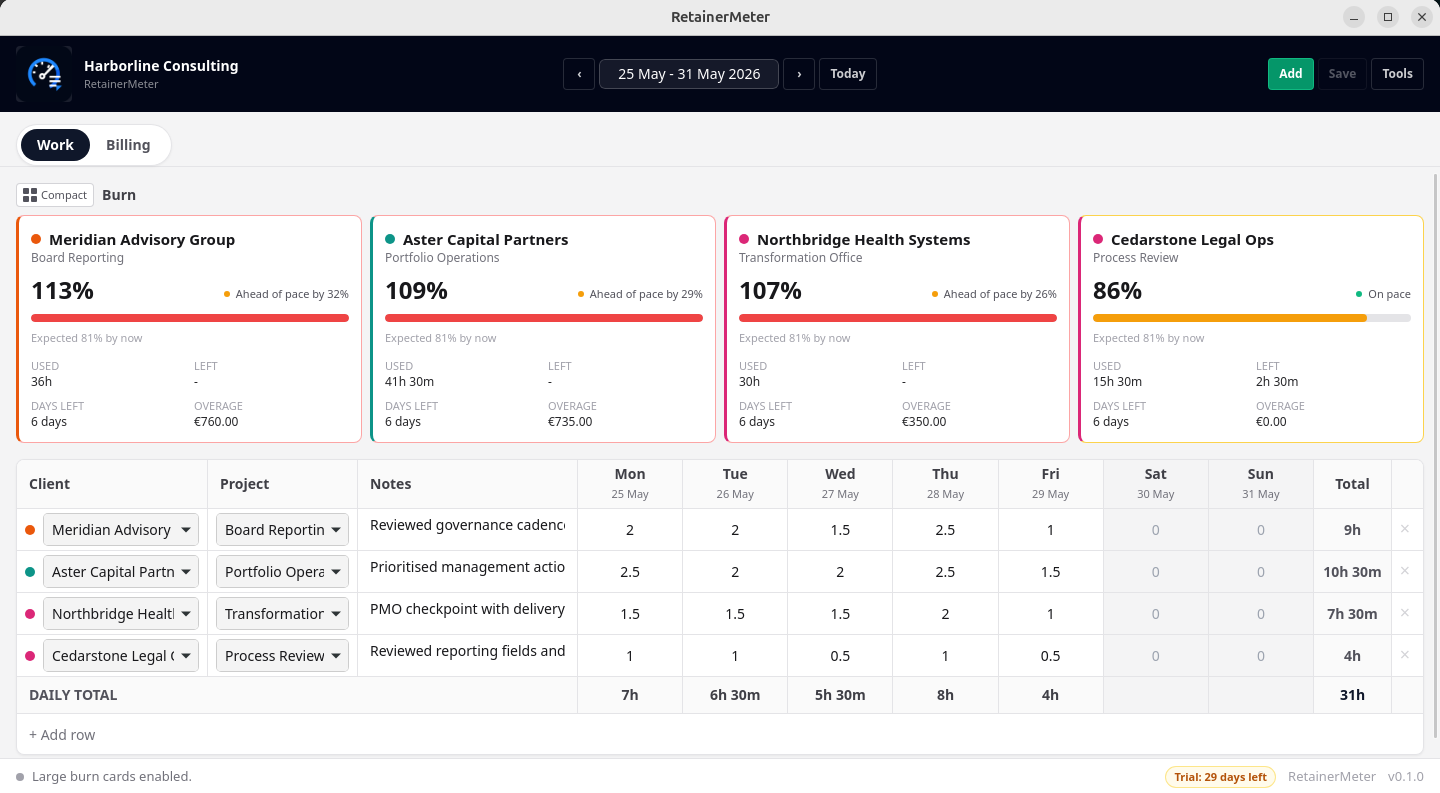
Retainer tracking software records work against a recurring client agreement and compares usage with the allowance, scope, or fee agreed for the billing period. Unlike a general timer, it should answer the commercial questions behind the hours: how much of the retainer has been used, whether work is burning faster than expected, and what must appear on the next invoice.
That distinction matters when a consultant manages several monthly retainers. A list of time entries can tell you what happened. A retainer view should tell you whether to slow down, discuss scope, request approval for additional work, or prepare an overage line item.
How RetainerMeter handles a monthly retainer
1. Record the agreement
Set the client, monthly fee, included hours, billing model, and additional-hours rate that apply to the work.
2. Log weekly work
Enter hours by client and day in a keyboard-friendly grid, with project and notes when you need an activity record.
3. Watch live burn
See hours used, hours remaining, percentage consumed, and pace against the point reached in the month.
4. Prepare billing
Preview the retainer fee, approved additional hours, tax, payments, and balance before exporting the invoice.
Three billing models, not one forced workflow
RetainerMeter supports hourly billing, a flat monthly retainer, and a retainer with additional billable hours. A flat retainer can be useful when the fee covers access, outcomes, or a defined scope and the time record is primarily an internal profitability signal. An hours-based allowance makes usage visible to both sides. A retainer-plus-additional-hours agreement connects the allowance with an agreed rate for approved work beyond it.
The app does not invent contract terms. Rollover, approval, scope, and additional-hours rules still belong in the client agreement. RetainerMeter provides the operational record needed to apply those rules consistently.
Who is it designed for?
The workflow fits people who sell recurring professional services and still need to understand capacity and billing. That includes IT and software consultants, business and marketing consultants, fractional CTOs and CFOs, independent advisers, coaches who bill business clients, designers on monthly retainers, contractors with recurring allowances, and small consulting agencies.
It is most useful when one person or a small practice owns the time record and invoicing workflow. It is not positioned as employee monitoring, enterprise resource planning, team scheduling, payroll, or a client portal.
Why live retainer burn matters
A month-end total arrives too late to manage expectations. If 80% of an allowance is used halfway through the month, the decision is not merely accounting. You may need to re-prioritise work, confirm what remains in scope, or ask the client to approve additional hours. A pace indicator turns the time record into an early conversation rather than an invoice-day surprise.
Local-first retainer management
Normal time tracking, burn calculations, client records, and invoice generation happen on your computer. There is no required cloud workspace and no account needed for daily use. Internet access is used for functions such as update checks, downloads, and online licence activation—not for storing ordinary client time data.
Local-first does not remove your responsibility for security or backups. RetainerMeter includes backup, restore, and CSV export so you can keep recoverable copies using the storage process you trust.