What should consultant invoicing software do?
Consultant invoicing software should produce a clear record of what was billed, when it was billed, and how the total was calculated. For retainer work, that means more than placing a client name and amount on a PDF. The invoice may need to distinguish the recurring fee from additional approved work and retain the exact version the client received.
Generic invoice tools can format a document well but still leave the consultant calculating hours elsewhere. RetainerMeter is designed around the connection between weekly time, monthly allowance, additional-hours rate, invoice preview, export, and payment status.
A retainer invoice workflow from source record to PDF
- Confirm the client terms. Check the billing model, retainer fee, included allowance, additional-hours rate, currency, tax, and payment terms.
- Review the time record. Make sure the correct client, project, dates, and notes are attached to the approved work.
- Check retainer usage. Compare hours used with the included allowance and resolve any approval or scope questions before billing.
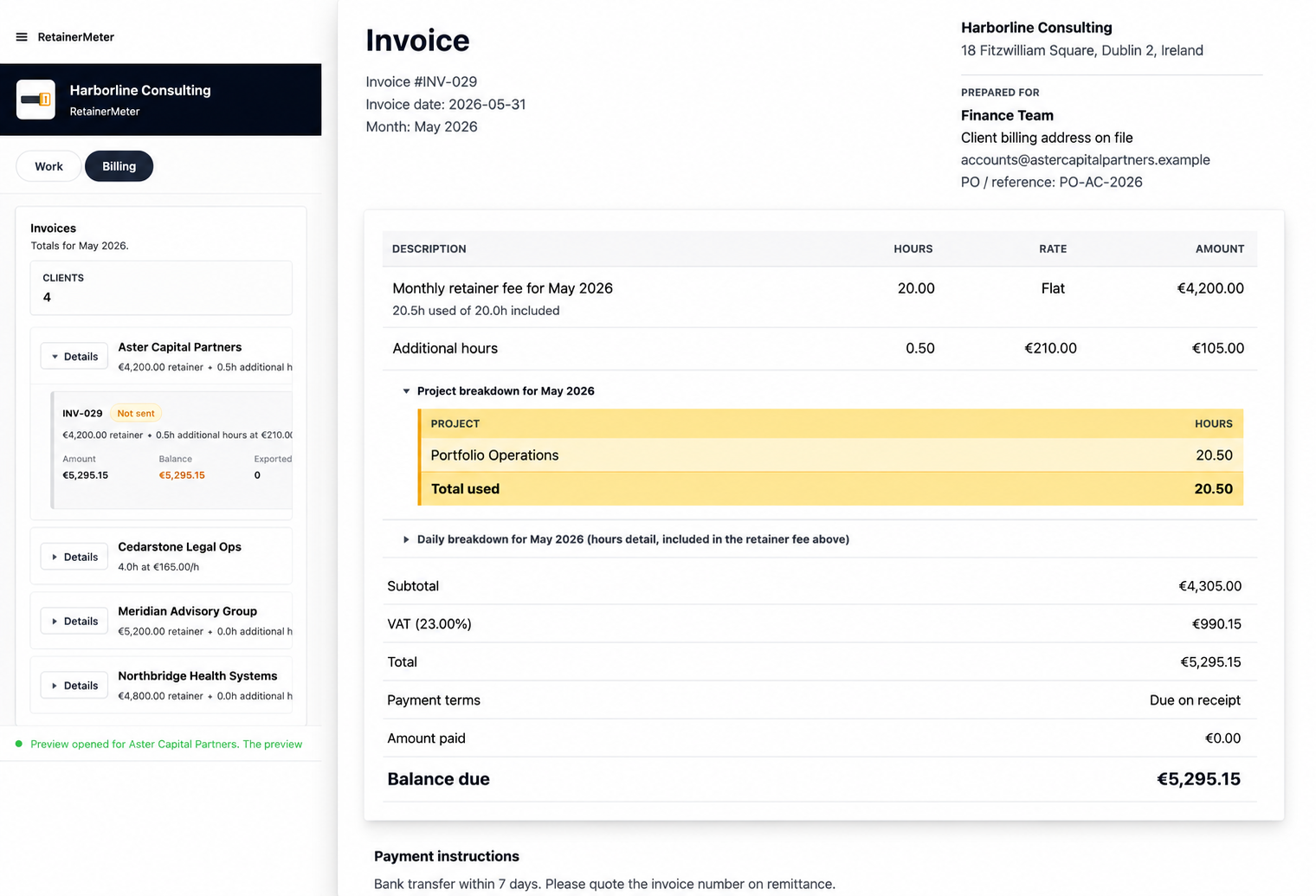
- Preview the invoice. Inspect the retainer line, additional-hours calculation, tax, payments, due date, and final balance.
- Export and preserve the record. Generate the PDF or HTML copy, then track whether the invoice is sent, paid, or void.
How additional hours appear
For a retainer with an hours allowance, additional hours equal approved hours above the included amount. The additional charge is that quantity multiplied by the agreed rate. RetainerMeter keeps the monthly fee and additional charge separate so the client can see why the total changed.
| Invoice line | Example |
|---|---|
| Monthly consulting retainer | $3,000, including 20 hours |
| Additional approved work | 4.5 hours × $175 = $787.50 |
| Subtotal before applicable tax | $3,787.50 |
Unused hours are not automatically a discount or credit. Whether they expire, roll over, or change future work depends on the client agreement. The software should record the inputs without inventing a policy.
Protect the invoice after sending
A sent invoice should not silently change because somebody corrects an old time entry. RetainerMeter locks exported billing records so invoice numbers, dates, line items, and totals remain connected to the version prepared for the client. Late-entered billable work can be handled as a separate additional-hours invoice rather than rewriting history.
PDF invoices and editable archive copies
RetainerMeter generates branded PDF invoices for sending and HTML copies for an editable local archive. The preview shows the commercial details before export: business and client information, billing period, line items, notes, tax, payment terms, and balance due.
Invoice and tax requirements vary by jurisdiction. RetainerMeter provides configurable currency, tax label, and tax rate, but it does not replace accounting or legal advice. Consultants remain responsible for confirming the required invoice fields and tax treatment in their market.
Who benefits from this workflow?
It is designed for independent consultants, freelancers, advisers, contractors, coaches, fractional executives, and small consulting agencies who bill recurring professional services. It is especially relevant when the invoice changes according to approved hours above a retainer or when invoice-day reconciliation is taking too long.